Release status
v0.5.6-Beta is now available. The main mode switch is working — one click changes your audio device selection between PC Mode and Radio Mode. Some menus and secondary features are still incomplete. Early testers welcome.
If you want fixes faster, alpha builds are released more frequently than beta. Download latest · Give feedback
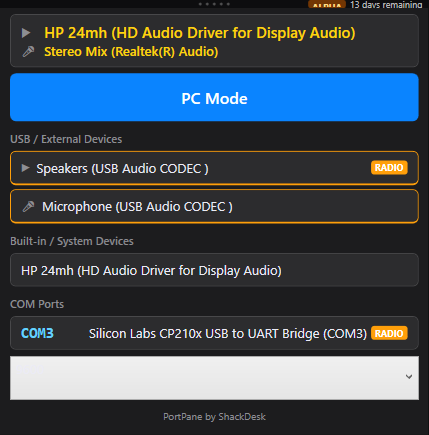
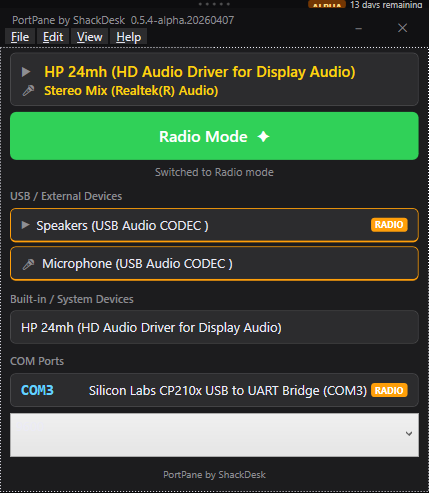
Every time you switch between digital modes — WSJT-X to Fldigi, JS8Call to Winlink — Windows makes you dig through audio settings and device manager to get the right COM port and audio device assigned. PortPane puts everything in one place and lets you save and restore configurations with a single click.
See all connected audio input and output devices at a glance. No more hunting through Sound settings.
All active COM ports listed with device names. Instantly see what's assigned and what's available.
Save your audio and port configuration for each mode or radio. Switch between them in one click.
No internet connection required. Works on go-kit laptops and EMCOMM deployments without modification.
Operating System
Windows 10 or Windows 11 (64-bit)
Runtime
.NET 8 — included with Windows 11; auto-prompted on Windows 10 if needed
Source Code
github.com/Computer-Tsu/ShackDesk-PortPane
Source & Services
Source code: MIT. Official ShackDesk builds, optional registration/personalization, and support are offered under separate commercial terms.
Code Signing Policy
Read the PortPane code signing policy